

Be first through
the gates.

BerzerkAIO is a desktop app that runs checkout tasks for Thailand's ticket rushes and limited drops. Ten site modules, one pure-HTTP engine, and no browser slowing it down. Releasing soon for macOS and Windows.

  • Releasing soon
  • macOS & Windows
The BerzerkAIO Tasks screen. Five Thaiticket Major tasks wait for 10:00:00, start together, and four book seats. The event and results are simulated.

The real Tasks screen, running a simulated on-sale. Event and results are made up.

Ten sites. Two arenas. One engine.

Full sitelist
  • Thaiticket Major
  • Ticketmelon
  • Allticket
  • Ticketier
  • Eventpop
  • Lazada
  • Shopee
  • Pop Mart
  • Carnival
  • Molly Factory

Every show
on one war map.

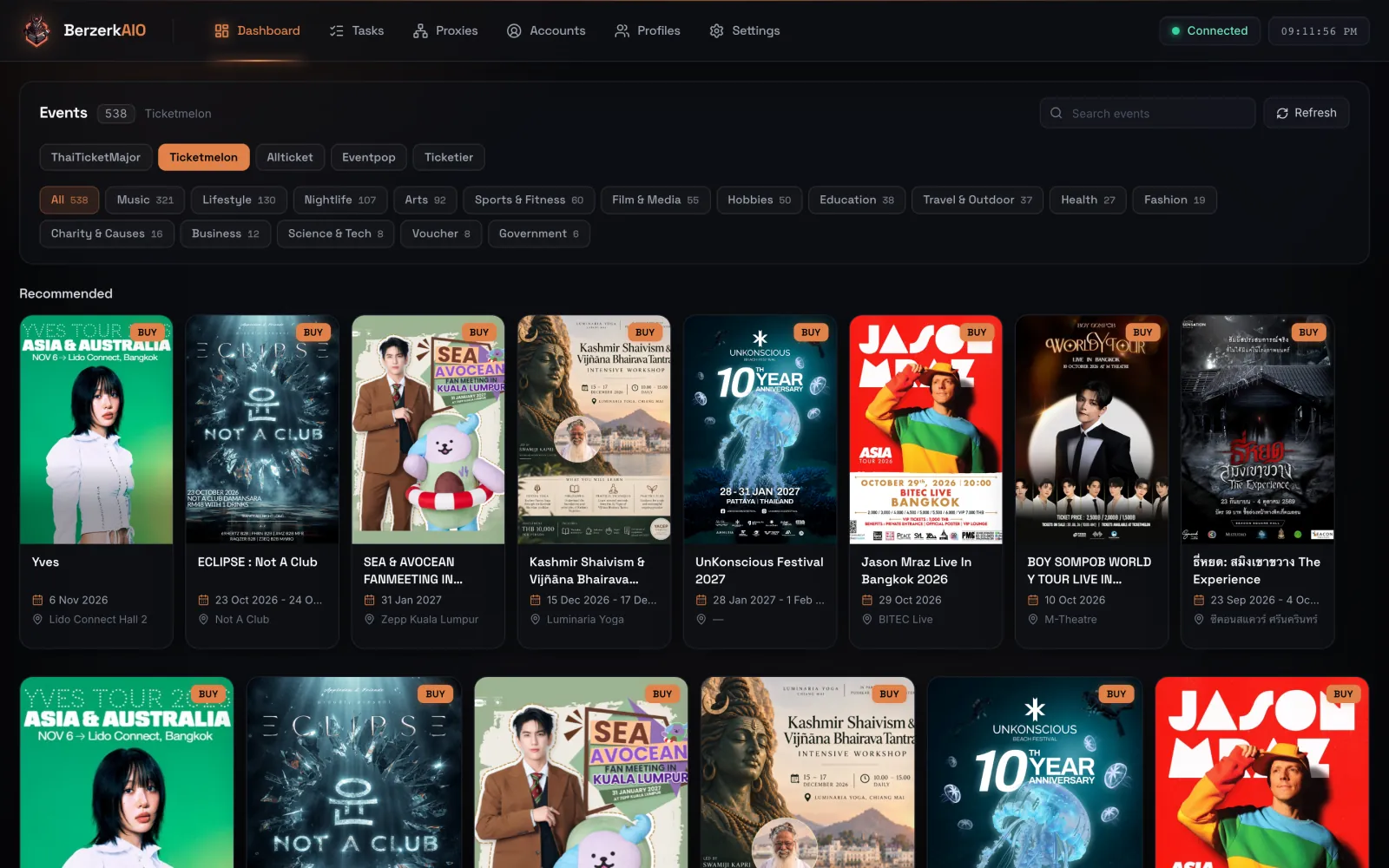
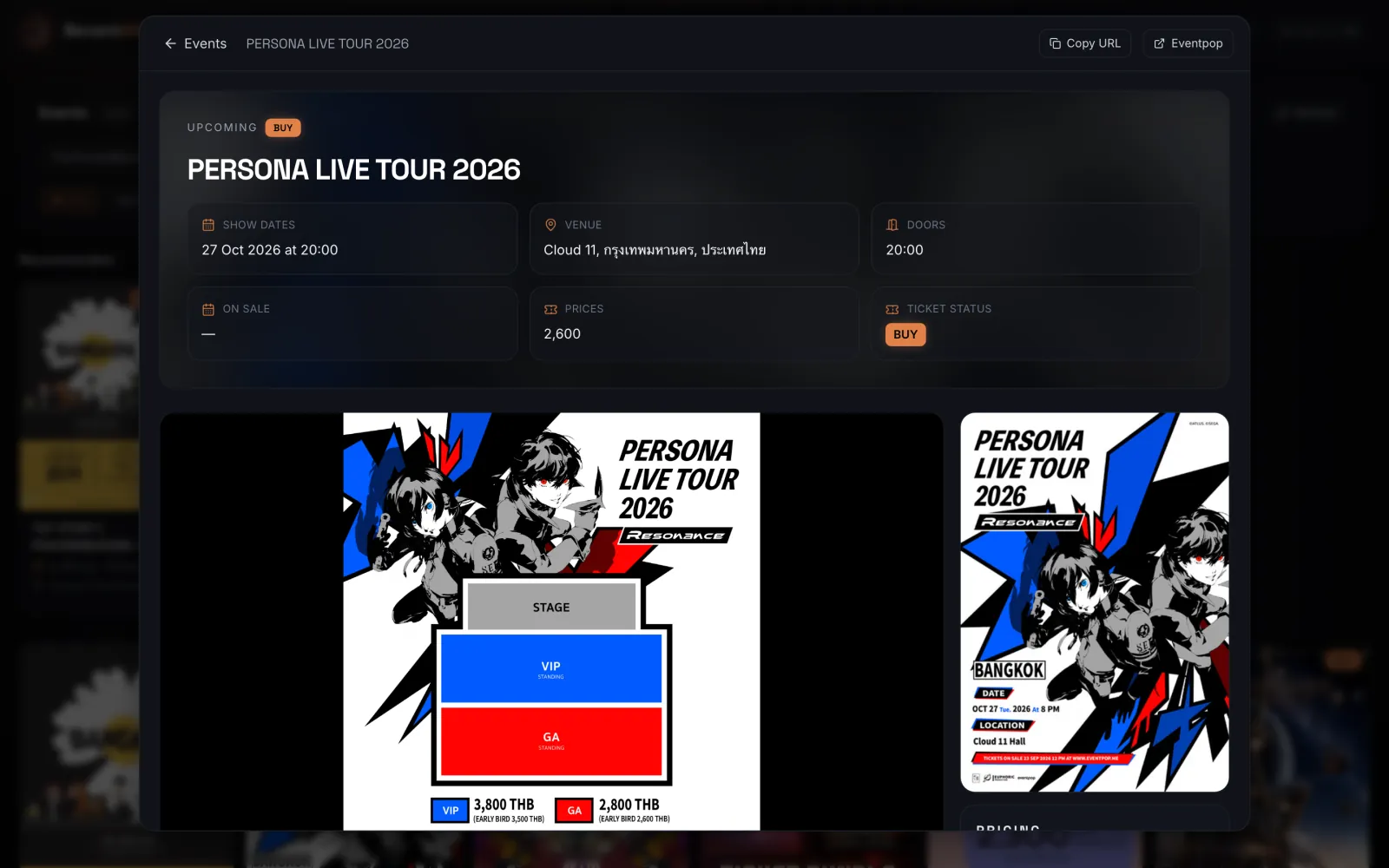
The dashboard pulls live catalogs from ThaiTicketMajor, Ticketmelon, Allticket, Eventpop and Ticketier: posters, show dates, venues, prices and seat plans. It reads public pages only, so your accounts never touch the catalog.

  • Five ticket sites, one switcher. Category and coming-soon filters on every source.
  • Event view with the details that matter. Rounds, doors, on-sale time, zone prices and the seat plan.
  • From poster to task. Open the event, copy its link, and point a task group at it.
BerzerkAIO
BerzerkAIO dashboard showing the Ticketmelon catalog with event posters, dates and venues
Event view for an Eventpop concert with show date, venue, price and the seat plan

Real screens from the app, 28 Sep 2026: the Ticketmelon source listed 538 events, Eventpop 174.

BerzerkAIO
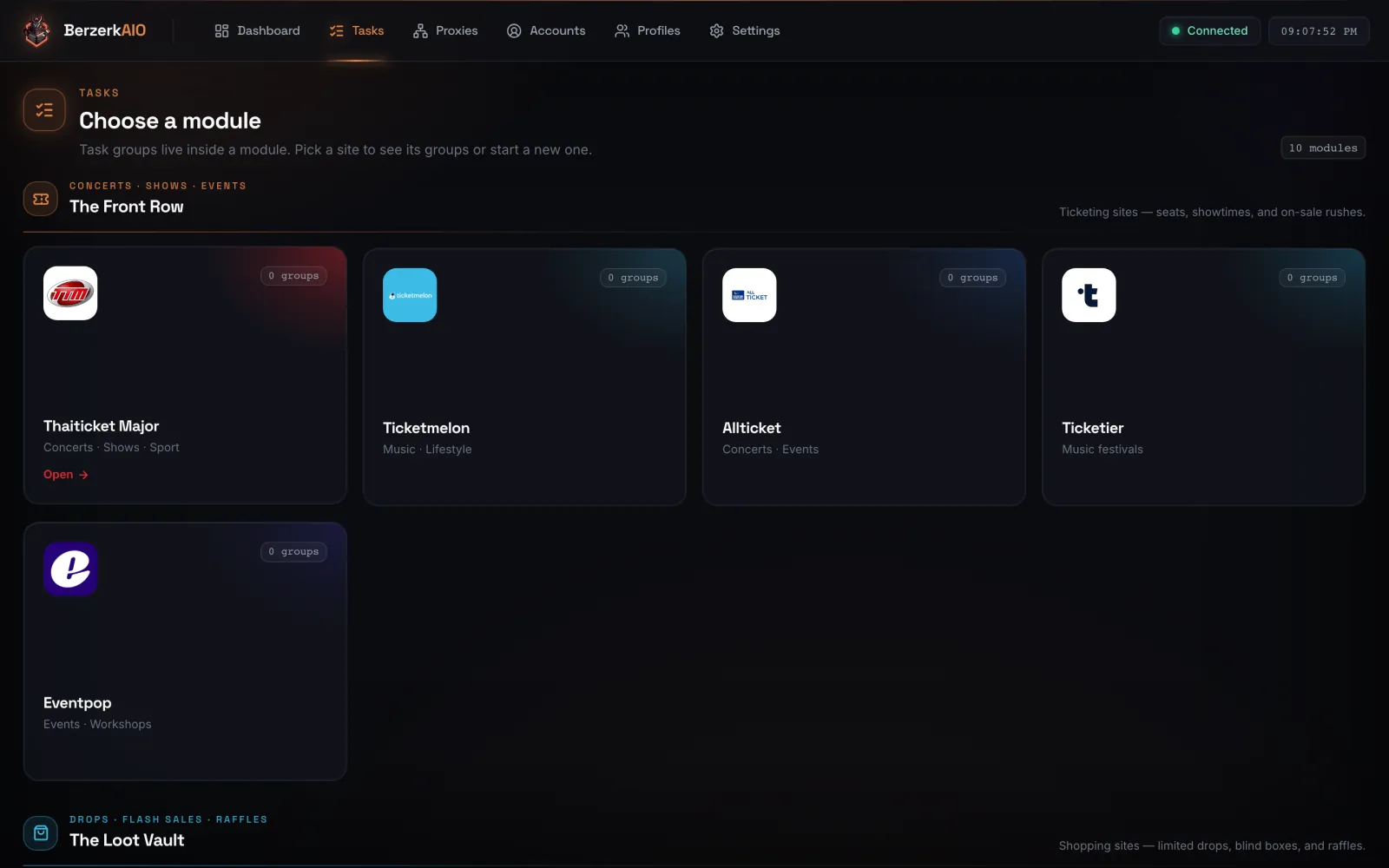
The Tasks page: pick a module from The Front Row ticketing sites or The Loot Vault shopping sites

Pick a battlefield.
Then send the horde.

Tasks live inside their site. A ThaiTicketMajor group only sees ThaiTicketMajor logins, so nothing crosses wires at the worst second. Build a group, add tasks, set the start time, and every row streams its own log.

  • Scheduled startTasks wake at the time you set
  • QuantityPer profile, per task
  • Monitor & retry delaysTuned per task, in milliseconds
  • Multi-cartSeveral products in one retail task
  • Price ceilingShopee tasks refuse to buy above your limit
  • Row controlsStart, stop and delete one task or the whole group

The sitelist

Ten modules in two arenas, the same way the app sorts them.

The Front Row

Ticketing. Seats, rounds and on-sale rushes.

5 modules
  • Thaiticket MajorConcerts · Shows · Sport
    Live catalogSaved sessions
  • TicketmelonMusic · Lifestyle
    Live catalog
  • AllticketConcerts · Events
    Live catalog
  • TicketierMusic festivals
    Live catalog
  • EventpopEvents · Workshops
    Live catalog

The Loot Vault

Shopping. Limited drops, blind boxes and raffles.

5 modules
  • ShopeeFlash sales · Drops
    Saved sessionsPrice ceiling
  • LazadaFlash sales · Drops
  • Pop MartBlind box drops
  • CarnivalSneaker raffles
  • Molly FactoryFigure drops

No browser
in the loop.

Every module talks to the site directly over HTTP, with Chrome-grade TLS fingerprints and no Chrome. Nothing renders a page, so nothing waits for one.

Your computer macOS & Windows
berzerk-engine 127.0.0.1 · pure HTTP
10 sites Tickets & retail, TH

Stays on your machine

Accounts, sessions, proxies and logs live on your computer. The engine answers on 127.0.0.1 and nowhere else.

Secrets masked

Passwords, tokens and bearer headers are masked before a log line is stored, so an exported log is safe to share with support.

Bring your solver keys

Akamai, Turnstile and friends go through the solver you choose. Keys are saved in Settings and never leave your machine except to that solver.

  • Hyper Solutions
  • Capsolver
  • 2Captcha
  • EZ-Captcha
  • SAD Captcha
  • AYCD Autosolve

Everything a rush needs,
already on the rack.

  • Accounts & saved sessions

    Hit play on an account to sign in and save the session. Tasks reuse it instead of logging in when the gates open.

  • Proxy groups

    Paste lists in bulk, sort them into groups, and point each task at a group.

  • Checkout profiles

    Shipping and billing details kept locally, ready for retail modules.

  • Discord webhooks

    Separate success, decline and status feeds. Send a test from Settings before the drop.

  • IMAP inboxes

    Connect email inboxes for verification codes and OTPs.

  • Run logs & export

    Every task start gets its own log. Export as JSON, CSV or HAR in one click.

  • Signed auto-updates

    Checks at launch and every four hours, downloads quietly, and never restarts while a task is running.

  • Alerts & sounds

    A chime, a ping or a full alert when something lands.

Awakening protocol

From download to your first checkout in three moves.

  1. Summon

    Install BerzerkAIO on release day. From then on it updates itself.

  2. Arm

    Add accounts, proxies, solver keys and webhooks. You do it once.

  3. Unleash

    Create a task group, set the start time, and watch the success feed.

Hunt with the pack.

BerzerkFNF is the sister community: Thailand's drop intelligence network, with 24/7 restock monitors for iPhone, Pokémon, Beyblade, sneakers and Thai retail.

Questions,
answered.

What is BerzerkAIO?

A desktop app that automates checkout on Thai ticketing and retail sites. You set up task groups; a local engine runs them over plain HTTP from your own computer. It is releasing soon for both macOS and Windows.

Which sites are supported?

ThaiTicketMajor, Ticketmelon, Allticket, Ticketier and Eventpop for tickets. Shopee, Lazada, Pop Mart, Carnival and Molly Factory for retail drops. See the sitelist.

When is BerzerkAIO released?

Soon, for both macOS and Windows. Join the waitlist and you will be the first to know when it is out.

Does it open a browser?

No. Every module runs requests-only; there is no hidden Chrome. When a site asks for something only you can do, such as a phone verification link, the app tells you what to do.

Do I need proxies and captcha keys?

For more than a handful of tasks, use proxies. Some sites sit behind Akamai or Cloudflare Turnstile and need a solver key. ThaiTicketMajor's Akamai, for example, runs through Hyper Solutions. Keys go in Settings → Captcha Providers.

How do updates work?

The app checks berzerkaio.com at launch and every four hours, downloads signed updates in the background, and offers a restart. It won't restart while a task is running.

Where is my data stored?

On your own computer. Accounts, sessions, proxies and logs are never uploaded to us.

How do I get BerzerkAIO?

Join the waitlist on Whop. When BerzerkAIO releases, you get the download and member support.

Is a checkout guaranteed?

No. Automation raises your odds; it can't create stock. Use it responsibly and follow each site's terms.

ADMIT ONEBERZERKAIO WAITLISTRELEASING SOON · MACOS & WINDOWS

Claim your seat.

BerzerkAIO releases soon for macOS and Windows. Get on the list and be first through the gates.

Gate
Whop
Row
AIO
Seat
Yours
Join the Waitlist free to join · whop.com/berzerkaio